Knowledge base How to Find Your Order Status by Using the Chat Now Feature
By Insight Editor / 9 Dec 2022
You can now find order status updates on insight.com by using the Insight Virtual Assistant.
Connect with the Virtual Assistant by selecting the Chat window at the bottom right of any page. If you don’t see the Chat now button, try turning off any ad blockers you may be using or contacting your IT department about changing browser settings to allow Java Script.
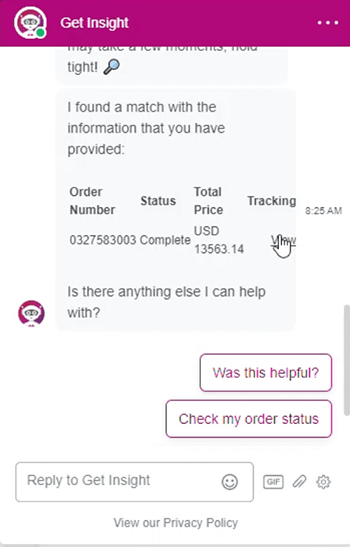
When Chat is selected, a new window will open on the page. There will be several buttons to choose from, including an Order & billing support button. Select that button and then select Check my order status.
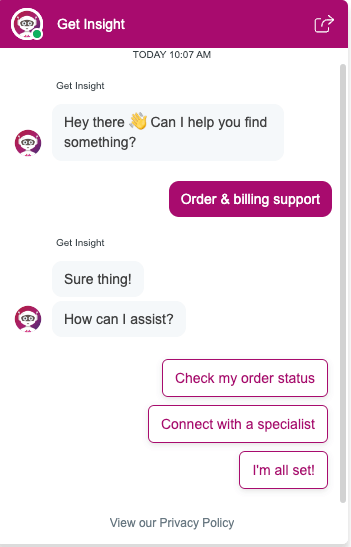
You’ll then be asked to provide one of the following options:
- Order number
- Purchase order
- Reference number
- Invoice number
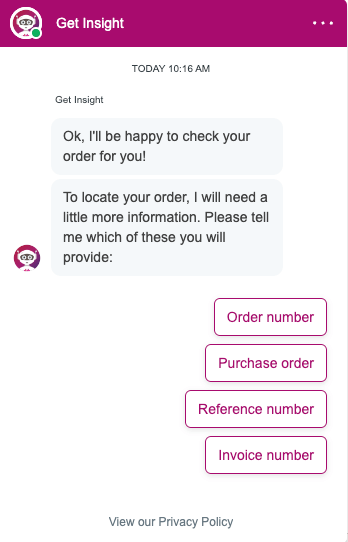
Select one of the options and submit the appropriate number. You'll then be asked to provide one of the following options:
- Account number
- Shipping postal code
- Contact name
- Contact email
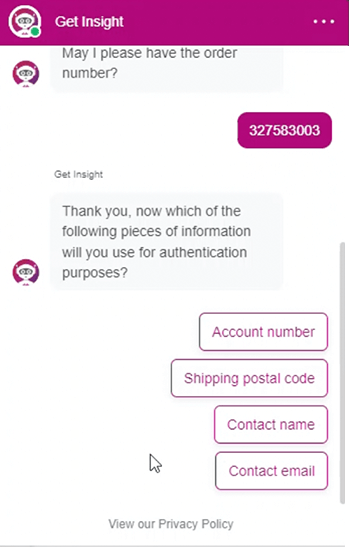
Once you provide the appropriate number, the Virtual Assistant will provide your order status details and you can select the order status to review the order through your logged-in account.