Knowledge base Overview: Insight.com Chat Capabilities
By Insight Editor / 13 Dec 2023
Insight regularly updates its live chat capabilities as part of our ongoing effort to deliver seamless transactions and support. We’ve created an efficient virtual agent that connects logged-in and logged-out clients with the right person based on their request.
Powered by InsightGPT — our internal generative AI platform — and Drift, our Get Insight virtual agent is available 24/7 to provide real-time, self-service support, including content related to our solutions and services. Live specialists are available for real-time assistance from 6 a.m. to 5 p.m. AZ.
How to use the Insight virtual agent
Our advanced routing connects you to solutions faster, addressing common client requests such as:
- Exploring solutions & services
- Request a quote or place an order
- Order & billing support
- CSP Indirect Program
- Insight.com account questions
- General support inquiries
Our virtual agent, Get Insight, is available at the bottom right of your screen from any insight.com page:


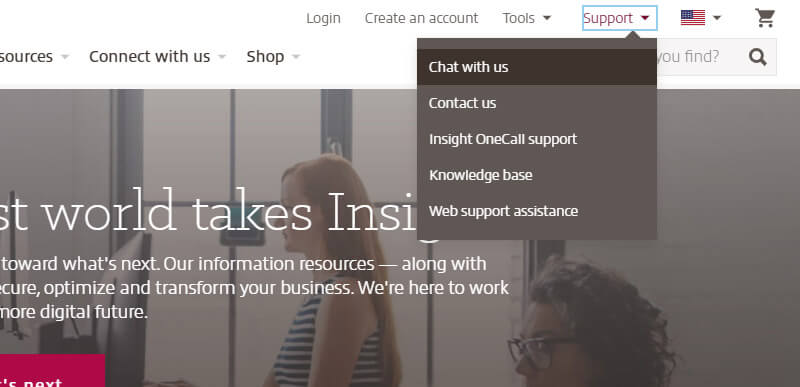
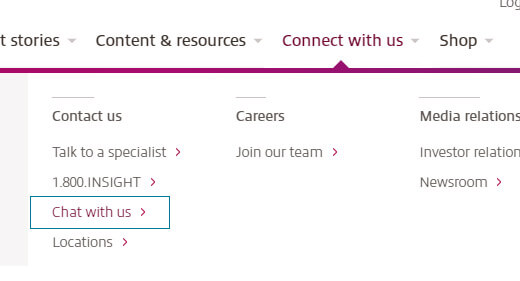
You can also access chat via two additional menus:
Accessing chat in the Support menu:
Accessing chat in the Connect with us menu:
Every conversation starts with Get Insight, our virtual agent, which will either route you to an appropriate Insight specialist or provide a helpful Insight Knowledge Base article to fulfill your request.
If your inquiry requires an Insight specialist outside of our business hours (6 a.m. to 5 p.m. AZ), you’ll have the option to leave a message, and our team will respond within 24 hours.
Our chat tool also supports:
- Stored conversation history for your session duration
- File attachments
- Emojis
- Gifs
What’s in store for the Get Insight virtual agent?
We’ve designed our chat with flexibility in mind, so it’ll meet your needs today and in the future. Our team regularly reviews chat performance to ensure positive, helpful experiences.
Your feedback is an important part of our review process, which is why we encourage you to rate each experience with the chat tool before exiting.
Here’s a preview of what’s in store for Insight chat:
- Schedule a meeting: You’ll be able to schedule a meeting with an Insight specialist directly from the chat window. A prompt will display available meeting dates and times. Once you’ve scheduled a meeting, a calendar invite will be sent directly to your inbox. You’ll also have the option to provide notes for the specialist to review prior to the call.
- Improved routing: Our team is implementing chat customizations that will update your initial inquiry options to reflect the web page you’re visiting. For instance, users exploring Insight’s solutions and services will have the option to connect directly with a specialist in that business area.
- Events: When you’re reviewing upcoming Insight events, you’ll have the option to connect directly with our events team through chat to request more information.