Partner Voices Exploring Samsung Interactive Displays in Education
By Insight Editor / 4 Jun 2022 / Topics: IT optimization , Change and training , Digital transformation
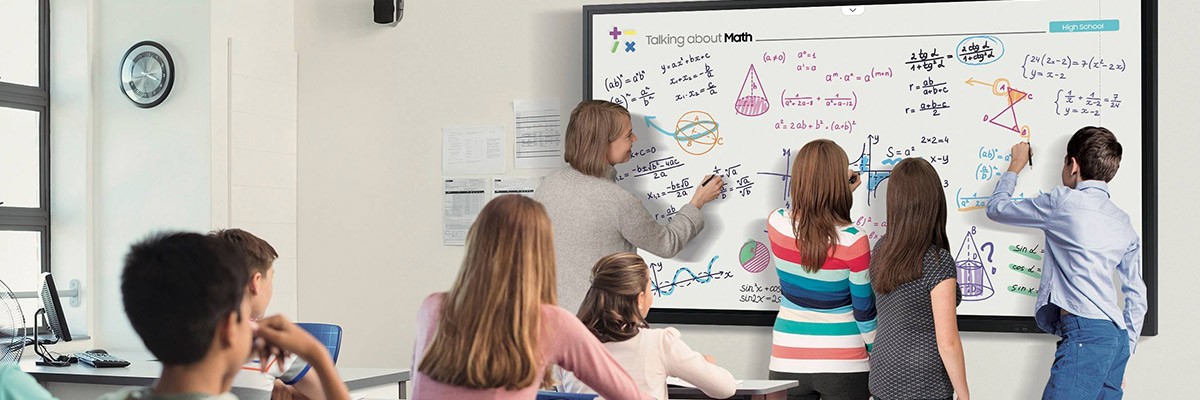
Dynamic classroom tools boost engagement. Discover how Samsung interactive displays bring the technology experiences students love outside of school into the classroom.
Built with both students and teachers in mind, Samsung interactive displays provide an all-in-one solution for dynamic learning. Flexible features equip teachers to generate material quickly, mix and match media types, and revise and repurpose lesson content.
In our recent webinar, we discussed how these interactive displays compare against traditional technologies such as projectors.
Interactive displays for hybrid learning
Today's hybrid education environment requires innovative solutions. Through interactive display technologies and their accompanying software, teachers can connect simultaneously with in-classroom and remote students, bridging gaps within the learning community.
Projector features
Though they come equipped with familiar technology, traditional projectors also bring the following challenges into the classroom:
- Calibration needs: Vibrations and movement can adjust the projector, leading to time-consuming, disruptive resets.
- Response time lags
- Lower range of clarity, color and visibility
- IT management difficulties
Samsung interactive display features
With a dynamic digital display from Samsung, you can:
- Experience smooth, pen-to-paper writing in a variety of colors, styles and widths.
- Allow simultaneous interaction and collaboration, with up to 20 people writing at the same time.
- Make the display a stand-alone solution with a built-in browser — no need to connect to an external source.
- Create art in brush mode, with a full, vibrant color range and both watercolor and oil painting options.
- Organize, share and protect data with built-in storage.