Infographic text included for screen readers:
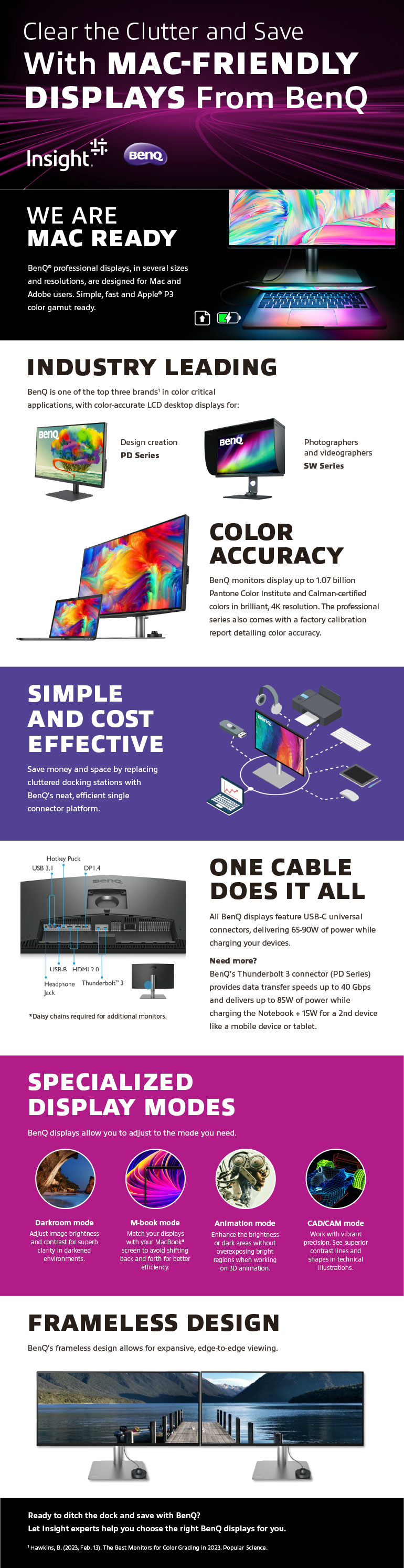
Clear the Clutter and Save With MAC-FRIENDLY DISPLAYS From BenQ
We are Mac Ready
BenQ professional displays, in several sizes and resolutions, are designed for Mac and Adobe users. Simple, fast and Apple P3 color gamut ready.
Industry leading
BenQ is one of the top three brands1 in color critical applications, with color-accurate LCD desktop displays for:
- Design Creation — PD Series
- Photographers and videographers — SW Series
Color accuracy
BenQ monitors display up to 1.07 billion Pantone Color Institute and Calman-certified colors in brilliant, 4K resolution. The professional series also comes with a factory calibration report detailing color accuracy.
Simple and cost effective
Save money and space by replacing cluttered docking stations with BenQ’s neat, efficient single connector platform.
One cable does it all
All BenQ displays feature USB-C universal connectors, delivering 65-90W of power while charging your devices.
Need more? BenQ’s Thunderbolt 3 connector (PD Series) provides data transfer speeds up to 40 Gbps and delivers up to 85W of power while charging the Notebook + 15W for a 2nd device like a mobile device or tablet.
*Daisy chains required for additional monitors.
Specialized Display Modes
BenQ displays allow you to adjust to the mode you need.
Darkroom mode
Adjust image brightness and contrast for superb clarity in darkened environments.
M-book mode
Match your displays with your MacBook® screen to avoid shifting back and forth for better efficiency.
Animation mode
Enhance the brightness or dark areas without overexposing bright regions when working on 3D animation.
CAD/CAM mode
Offers superior contrast to lines and shapes in technical illustrations.
Frameless Design
BenQ’s frameless design allows for expansive, edge-to-edge viewing.
1 Hawkins, B. (2023, Feb. 13). The Best Monitors for Color Grading in 2023. Popular Science.